慢慢的生活的主旋律变成了生活本身。
工作稳定,财富积累也打下了还算说得过去的基础。接下来就是珍视每一天,想着法儿的给每天的日子填点颜色,增些热闹。
关于如何认真生活,我想到的第一个办法就是先从认真记录开始。所以认真生活就从记录开始吧
慢慢的生活的主旋律变成了生活本身。
工作稳定,财富积累也打下了还算说得过去的基础。接下来就是珍视每一天,想着法儿的给每天的日子填点颜色,增些热闹。
关于如何认真生活,我想到的第一个办法就是先从认真记录开始。所以认真生活就从记录开始吧
SELECT Start_Date, End_Date
FROM
    (SELECT Start_Date FROM Projects WHERE Start_Date NOT IN (SELECT End_Date FROM Projects)) a,
    (SELECT End_Date FROM Projects WHERE End_Date NOT IN (SELECT Start_Date FROM Projects)) b
WHERE Start_Date < End_Date
GROUP BY Start_Date
ORDER BY DATEDIFF(End_Date, Start_Date), Start_Date
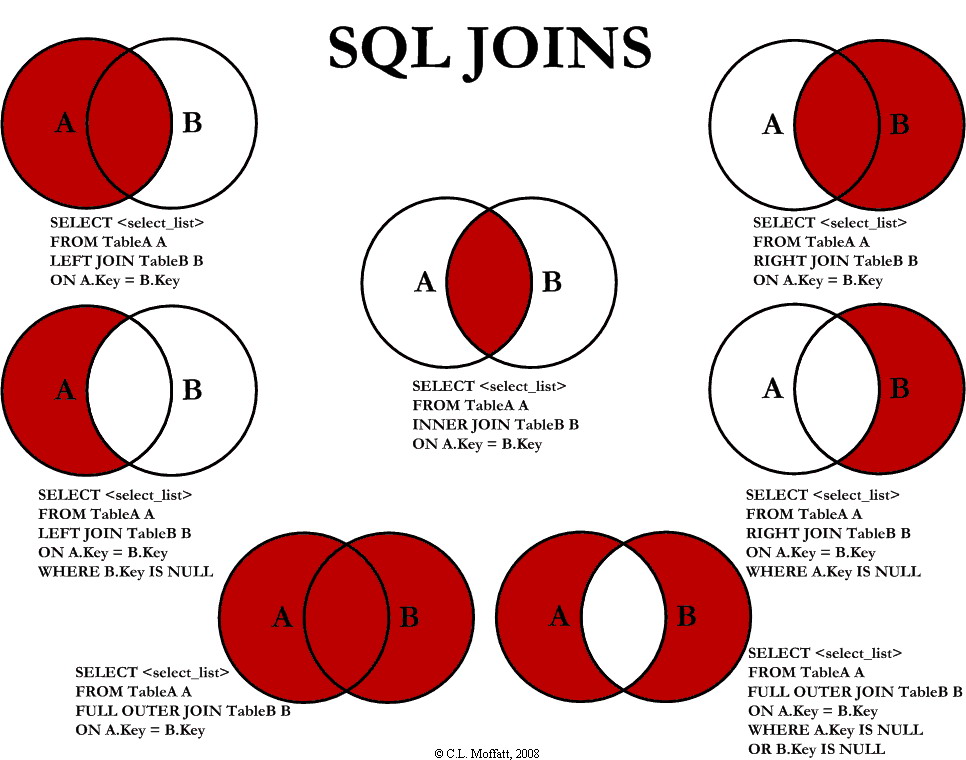
JOINs.JOINs, but I couldn't find any to my liking. Some had good diagrams but lacked completeness (they didn't have all the possible JOINs), and some were just plain terrible. So, I decided to create my own and write an article about it.INNER JOINLEFT JOINRIGHT JOINOUTER JOINLEFT JOIN EXCLUDING INNER JOINRIGHT JOIN EXCLUDING INNER JOINOUTER JOIN EXCLUDING INNER JOINLEFT EXCLUDING JOIN, RIGHT EXCLUDING JOIN, andOUTER EXCLUDING JOIN, respectively. Some may argue that 5, 6, and 7 are not really joining the two tables, but for simplicity, I will still refer to these as Joins because you use a SQL Join in each of these queries (but exclude some records with a WHERE clause).
SELECT <select_list>
FROM Table_A A
INNER JOIN Table_B B
ON A.Key = B.Key

SELECT <select_list>
FROM Table_A A
LEFT JOIN Table_B B
ON A.Key = B.Key

SELECT <select_list>
FROM Table_A A
RIGHT JOIN Table_B B
ON A.Key = B.Key

FULL OUTER JOIN or a FULL JOIN. This query will return all of the records from both tables, joining records from the left table (table A) that match records from the right table (table B). This Join is written as follows:SELECT <select_list>
FROM Table_A A
FULL OUTER JOIN Table_B B
ON A.Key = B.Key

SELECT <select_list>
FROM Table_A A
LEFT JOIN Table_B B
ON A.Key = B.Key
WHERE B.Key IS NULL

SELECT <select_list>
FROM Table_A A
RIGHT JOIN Table_B B
ON A.Key = B.Key
WHERE A.Key IS NULL

SELECT <select_list>
FROM Table_A A
FULL OUTER JOIN Table_B B
ON A.Key = B.Key
WHERE A.Key IS NULL OR B.Key IS NULL
TABLE_A
  PK Value
---- ----------
   1 FOX
   2 COP
   3 TAXI
   6 WASHINGTON
   7 DELL
   5 ARIZONA
   4 LINCOLN
  10 LUCENT

TABLE_B
  PK Value
---- ----------
   1 TROT
   2 CAR
   3 CAB
   6 MONUMENT
   7 PC
   8 MICROSOFT
   9 APPLE
  11 SCOTCH
-- INNER JOIN
SELECT A.PK AS A_PK, A.Value AS A_Value,
       B.Value AS B_Value, B.PK AS B_PK
FROM Table_A A
INNER JOIN Table_B B
ON A.PK = B.PK

A_PK A_Value    B_Value    B_PK
---- ---------- ---------- ----
   1 FOX        TROT          1
   2 COP        CAR           2
   3 TAXI       CAB           3
   6 WASHINGTON MONUMENT      6
   7 DELL       PC            7

(5 row(s) affected)
-- LEFT JOIN
SELECT A.PK AS A_PK, A.Value AS A_Value,
B.Value AS B_Value, B.PK AS B_PK
FROM Table_A A
LEFT JOIN Table_B B
ON A.PK = B.PK

A_PK A_Value    B_Value    B_PK
---- ---------- ---------- ----
   1 FOX        TROT          1
   2 COP        CAR           2
   3 TAXI       CAB           3
   4 LINCOLN    NULL       NULL
   5 ARIZONA    NULL       NULL
   6 WASHINGTON MONUMENT      6
   7 DELL       PC            7
  10 LUCENT     NULL       NULL

(8 row(s) affected)
-- RIGHT JOIN
SELECT A.PK AS A_PK, A.Value AS A_Value,
B.Value AS B_Value, B.PK AS B_PK
FROM Table_A A
RIGHT JOIN Table_B B
ON A.PK = B.PK

A_PK A_Value    B_Value    B_PK
---- ---------- ---------- ----
   1 FOX        TROT          1
   2 COP        CAR           2
   3 TAXI       CAB           3
   6 WASHINGTON MONUMENT      6
   7 DELL       PC            7
NULL NULL       MICROSOFT     8
NULL NULL       APPLE         9
NULL NULL       SCOTCH       11

(8 row(s) affected)
-- OUTER JOIN
SELECT A.PK AS A_PK, A.Value AS A_Value,
B.Value AS B_Value, B.PK AS B_PK
FROM Table_A A
FULL OUTER JOIN Table_B B
ON A.PK = B.PK

A_PK A_Value    B_Value    B_PK
---- ---------- ---------- ----
   1 FOX        TROT          1
   2 COP        CAR           2
   3 TAXI       CAB           3
   6 WASHINGTON MONUMENT      6
   7 DELL       PC            7
NULL NULL       MICROSOFT     8
NULL NULL       APPLE         9
NULL NULL       SCOTCH       11
   5 ARIZONA    NULL       NULL
   4 LINCOLN    NULL       NULL
  10 LUCENT     NULL       NULL

(11 row(s) affected)
-- LEFT EXCLUDING JOIN
SELECT A.PK AS A_PK, A.Value AS A_Value,
B.Value AS B_Value, B.PK AS B_PK
FROM Table_A A
LEFT JOIN Table_B B
ON A.PK = B.PK
WHERE B.PK IS NULL

A_PK A_Value    B_Value    B_PK
---- ---------- ---------- ----
   4 LINCOLN    NULL       NULL
   5 ARIZONA    NULL       NULL
  10 LUCENT     NULL       NULL
(3 row(s) affected)
-- RIGHT EXCLUDING JOIN
SELECT A.PK AS A_PK, A.Value AS A_Value,
B.Value AS B_Value, B.PK AS B_PK
FROM Table_A A
RIGHT JOIN Table_B B
ON A.PK = B.PK
WHERE A.PK IS NULL

A_PK A_Value    B_Value    B_PK
---- ---------- ---------- ----
NULL NULL       MICROSOFT     8
NULL NULL       APPLE         9
NULL NULL       SCOTCH       11

(3 row(s) affected)
-- OUTER EXCLUDING JOIN
SELECT A.PK AS A_PK, A.Value AS A_Value,
B.Value AS B_Value, B.PK AS B_PK
FROM Table_A A
FULL OUTER JOIN Table_B B
ON A.PK = B.PK
WHERE A.PK IS NULL
OR B.PK IS NULL

A_PK A_Value    B_Value    B_PK
---- ---------- ---------- ----
NULL NULL       MICROSOFT     8
NULL NULL       APPLE         9
NULL NULL       SCOTCH       11
   5 ARIZONA    NULL       NULL
   4 LINCOLN    NULL       NULL
  10 LUCENT     NULL       NULL

(6 row(s) affected)
OUTER JOIN that the inner joined records are returned first, followed by the right joined records, and then finally the left joined records (at least, that's how my Microsoft SQL Server did it; this, of course, is without using any ORDER BY statement).